行属性:(没有width宽度属性)**
height 高度
bgcolor 背景颜色
align 文字水平对齐left、right、center
valign 文字垂直对齐top、middle、bottom
**
单元格属性:**
width 宽度(影响一列的宽度)
height 高度(影响一行的高度)
bgcolor 背景颜色
align 文字水平对齐
valign 文字垂直对齐
1 2 3 4 5 6 7 8 9 10 <table > 表 <tr > 行 <td > 1</td > 单元格 <td > 2</td > </tr > <tr > <td > 3</td > <td > 4</td > </tr > </table >
表格的合并:colspan合并列、rowspan合并行
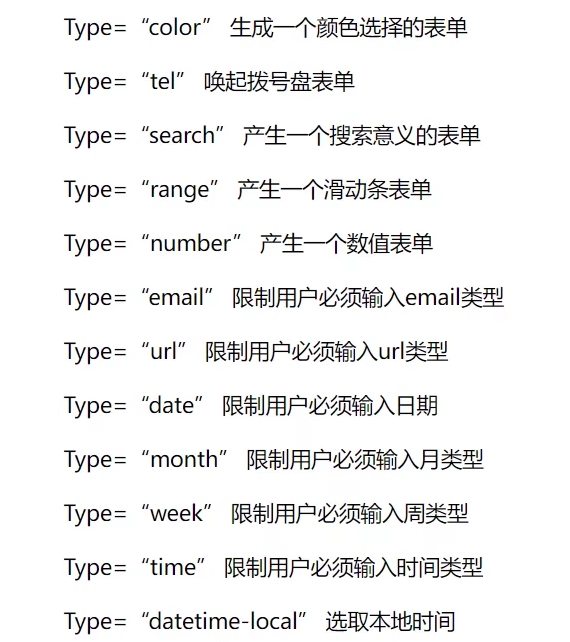
1 2 3 4 5 6 7 8 9 10 11 12 13 14 15 16 17 18 19 20 21 22 23 24 25 26 27 28 <form method ="get/post" action ="表单数据发送URL" > <input type ="..." /> < A. 属性type定义输入框的类型 a) 文本框、密码框 <input type ="text|password" /> b) 提交框 <input type ="submit" /> c) 按钮框 <input type ="button" /> 单纯的按钮 d) 重置框 <input type ="reset" /> 清空表单内容 e) 单选框 <input type ="radio" name ="sex" value ="male" /> 男 <input type ="radio" name ="sex" value ="female" /> 女 f) 多选框 <input type ="checkbox" name ="transport" value ="bike" /> 自行车 <input type ="checkbox" name ="transport" value ="bus" /> 公共汽车 g) 文件上传<input type ="file" /> h) 下拉菜单 <select size ="3" name ="xxx" > //视角大小为3 <option disabled selected > ==请选择===</option > <option value ="1" > 1</option > <option value ="2" > 2</option > <option value ="3" > 3</option > </select > i) 多行文本 <textarea name ="xxx" rows =2 cols =1 > …</textarea > B. 属性placeholder描述输入字段预期值的简短信息提示 C. 属性name必须设置,否则在提交的时候输入的数据不会发送 D. 属性value,输入框默认输入内容,加在按钮上为标题 如:<input type ="submit" value ="上传" /> <input type ="reset" value ="重置" /> > </form >
disabled属性可以禁用
...
img
9、锚点
1 2 3 <div id ="#aaa" > </div > <a herf ="#aaa" > 点击定位到a</a >
CSS
1 2 3 4 5 6 7 8 9 10 11 12 13 14 15 16 17 18 19 20 21 22 23 <head > <style > *{ 通用选择器 margin :0px } h1 { 标签选择器 color :red; } #name { 类选择器class color :green; } .id { id选择器 color :blue } </style > </head > 方法一: <style type ="text/css" > @import url("CSS文件路径" ) </style > 方法二: <link rel ="stylesheet" type ="text/css" href ="css文件路径" > <div style ="width:200px" > </div >
CSS样式表的优先级:行内>内部>外部
1 2 3 4 a:link{属性:属性值} 超链接的初始状态 a:visited{属性:属性值} 超链接被访问后的状态 a:hover{属性:属性值} 鼠标悬停时的状态 a:active{属性:属性值} 鼠标按下超链接的状态
link--visited--hover--active
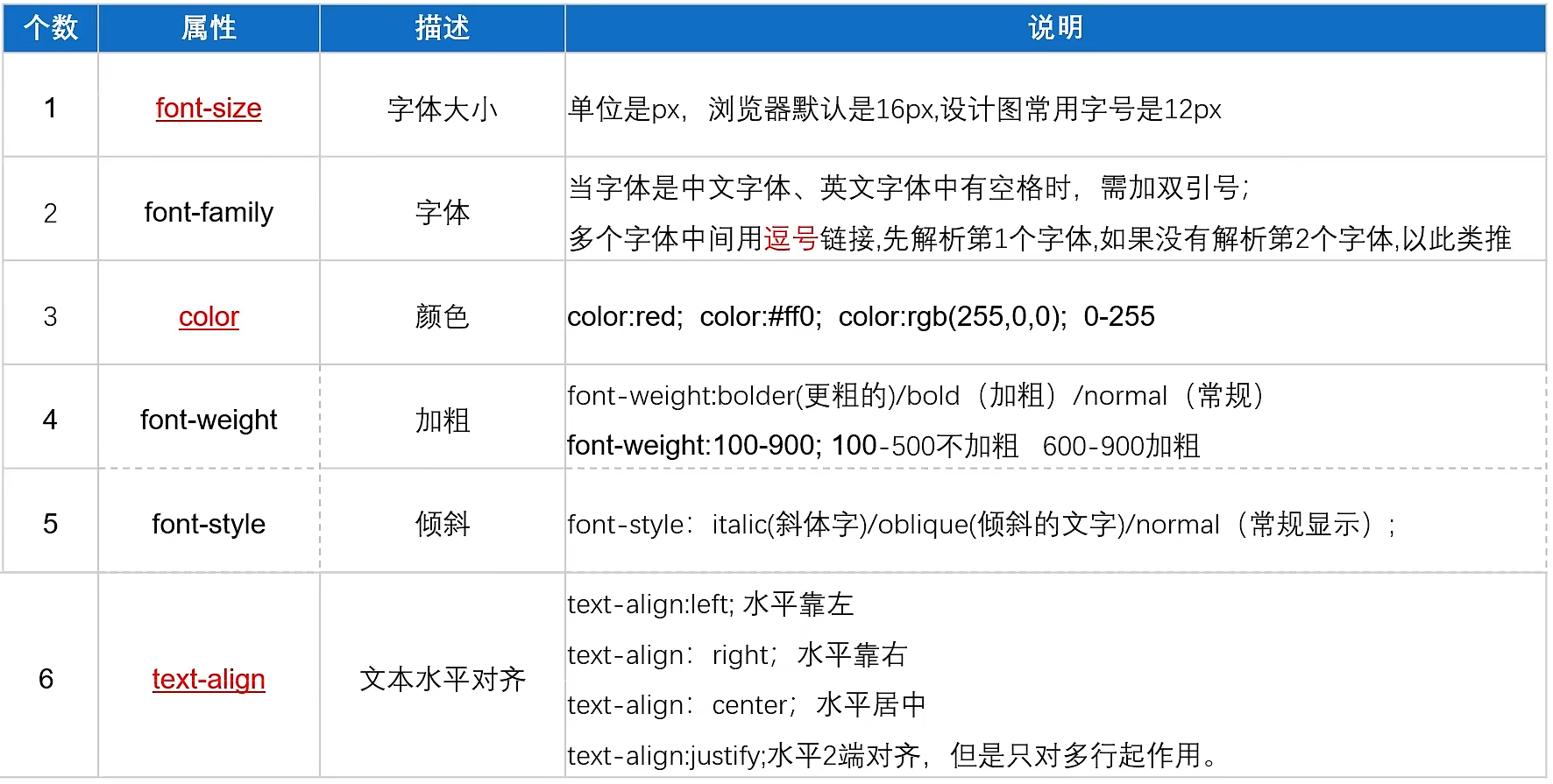
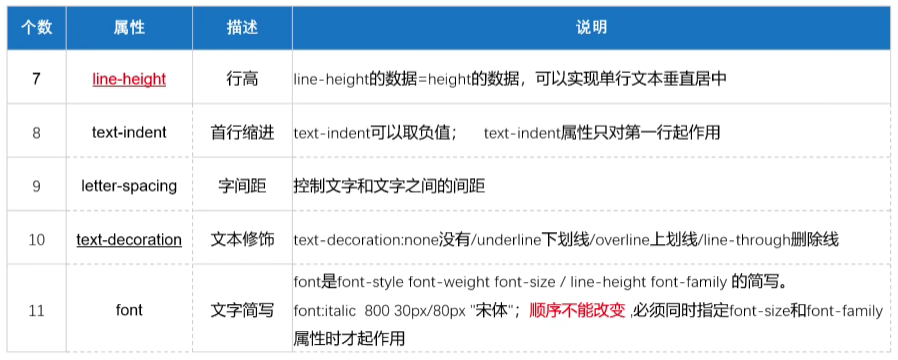
1、文本属性
1 2 3 文本首字母大写:text-transform:capitalize 文本转小写:text-transform:lowercase 文字转大写:text-transform:uppercase
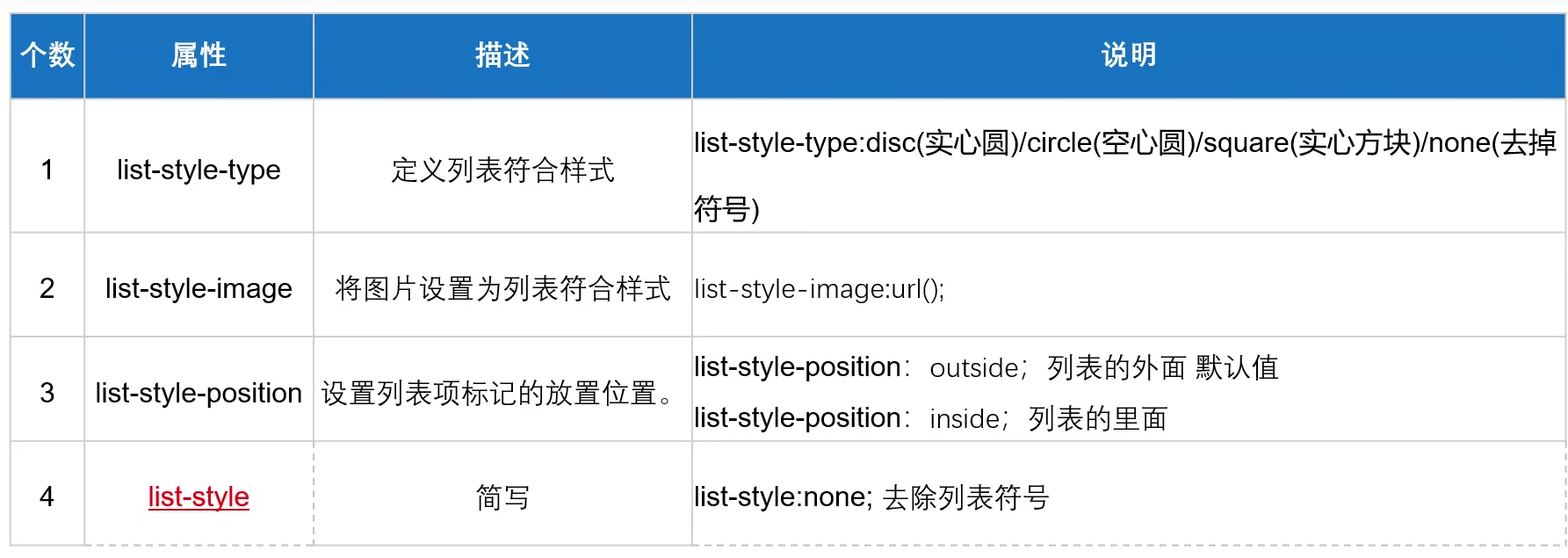
2、列表属性
img
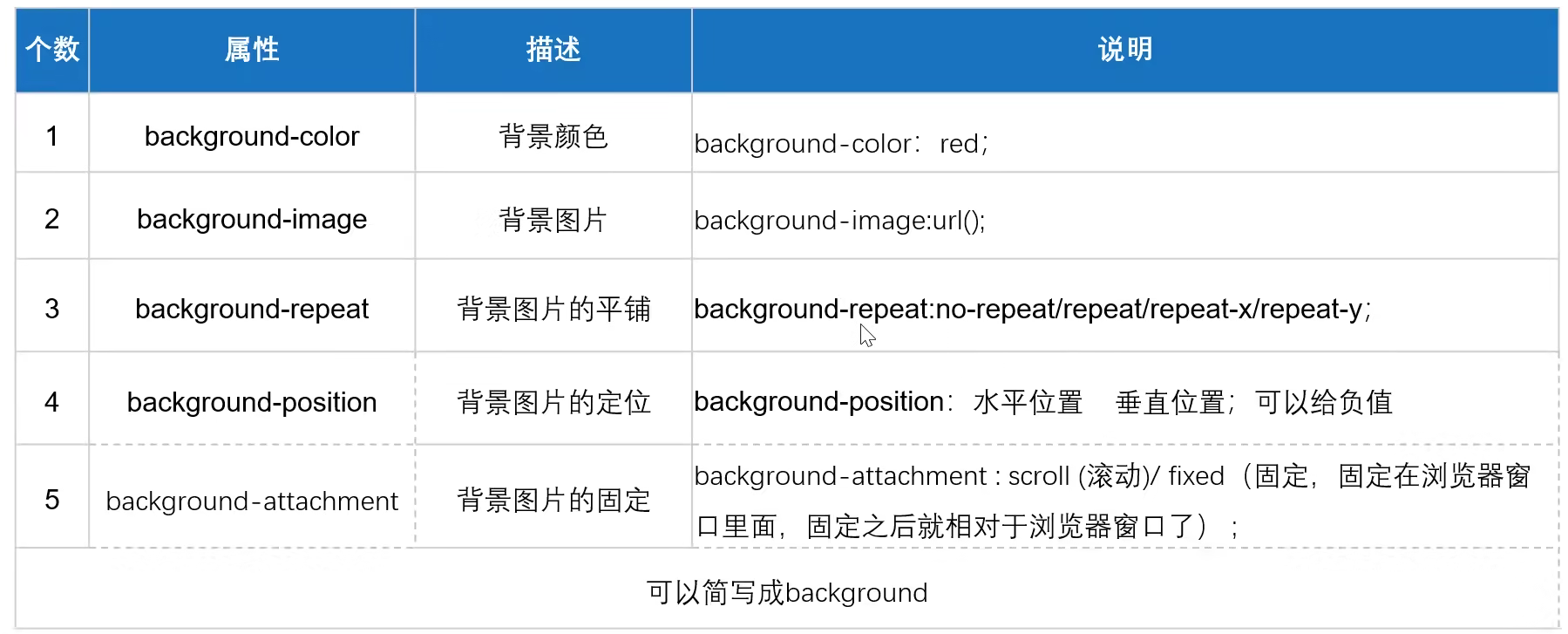
3、背景属性
img
1 2 3 background-size:cover background-size:100% 100% background-size:100px 100px
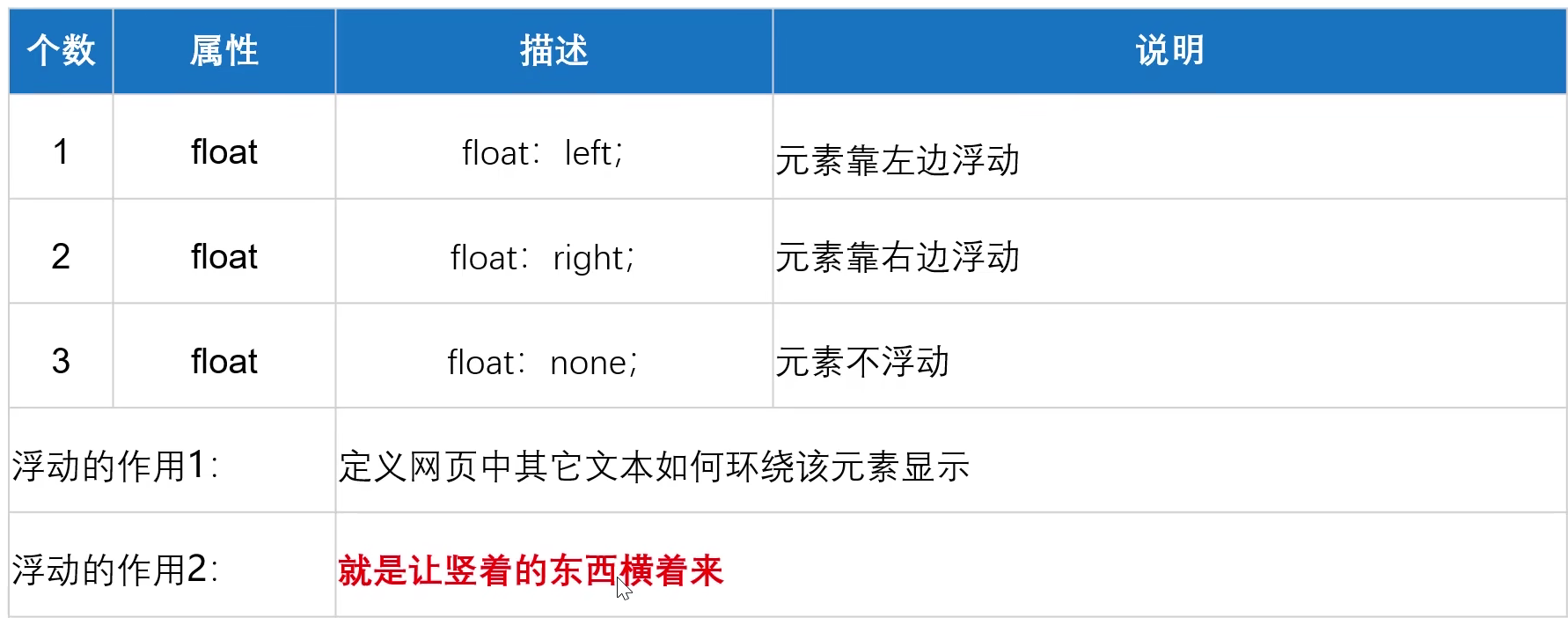
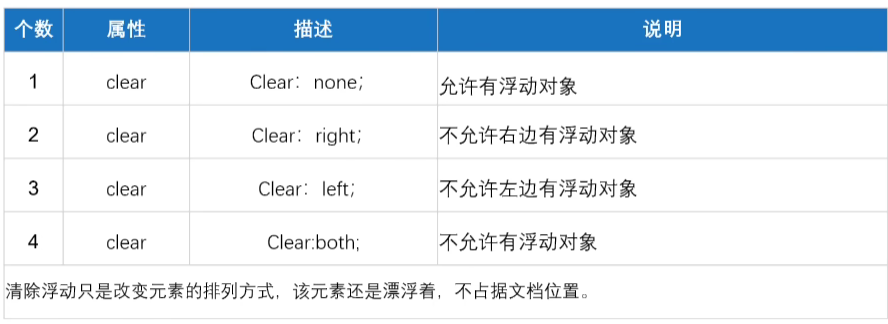
4、浮动float属性
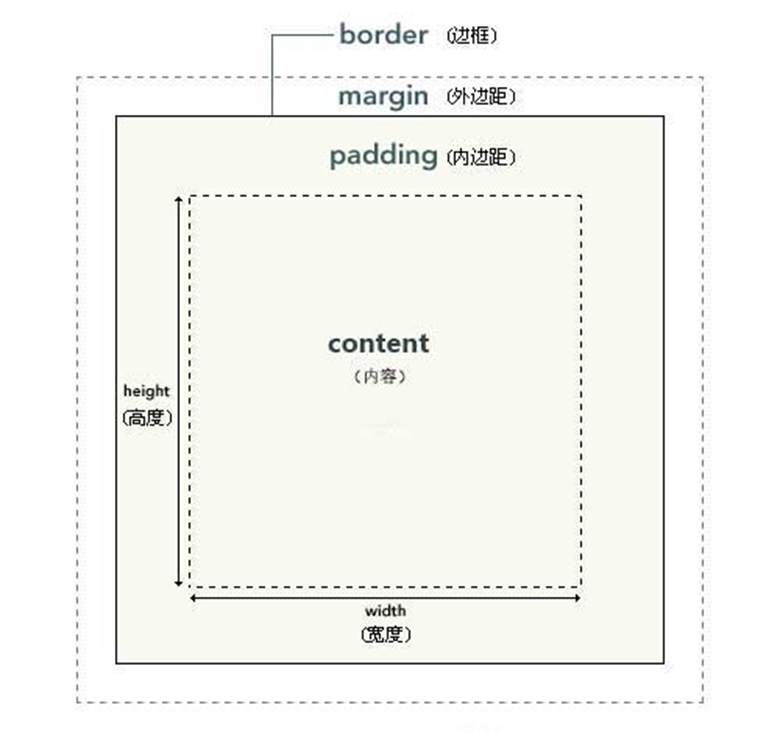
5、盒子模型
img
内边距 padding、外边距 margin
1个值,4个方向一样
2个值,上下,左右
3个值,上,左右,下
4个值,上,右,下,左
边框 border(width style
color)
样式:
none:没有边框,也即忽略边框的宽度;
dotted:点线;
dashed:虚线;
solid:实线;
double:双线;
groove:3D凹槽;
ridge:菱形边框;
inset:3D凹边;
outset:3D凸边;
屏幕横向居中
注意:margin垂直方向外边距取最大值,水平方向取和
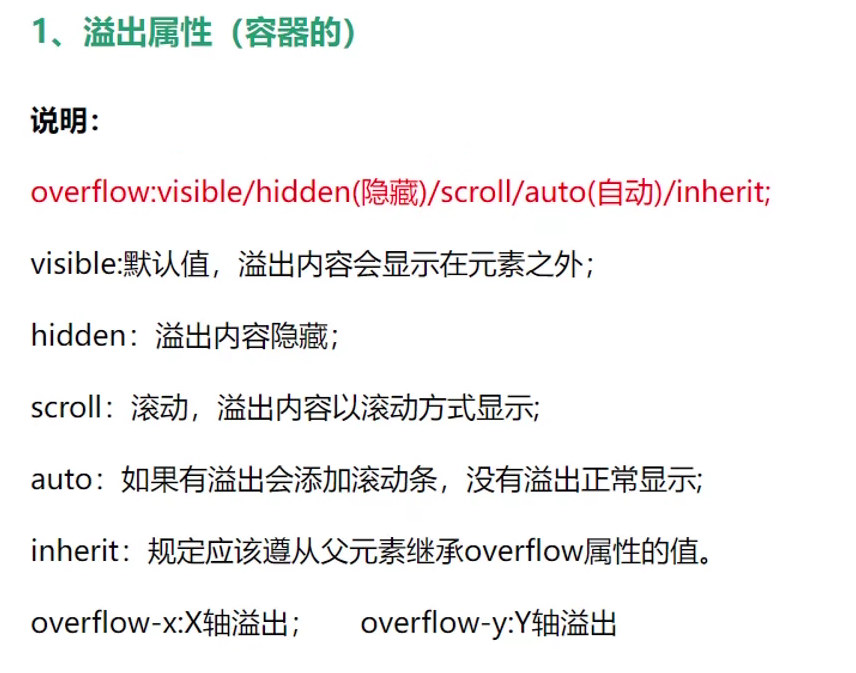
6、溢出属性
(1)overflow:
img
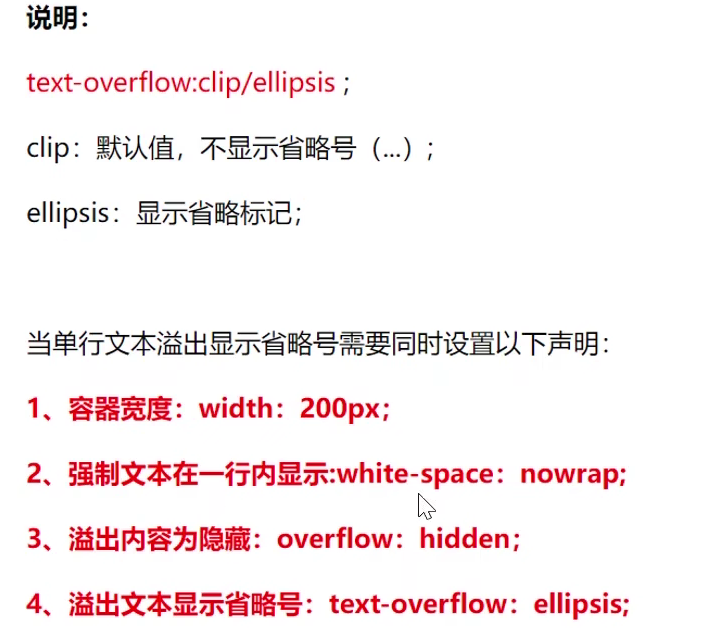
(2)white-space
img
(3)text-overflow(必须有宽度width!!!!)
img
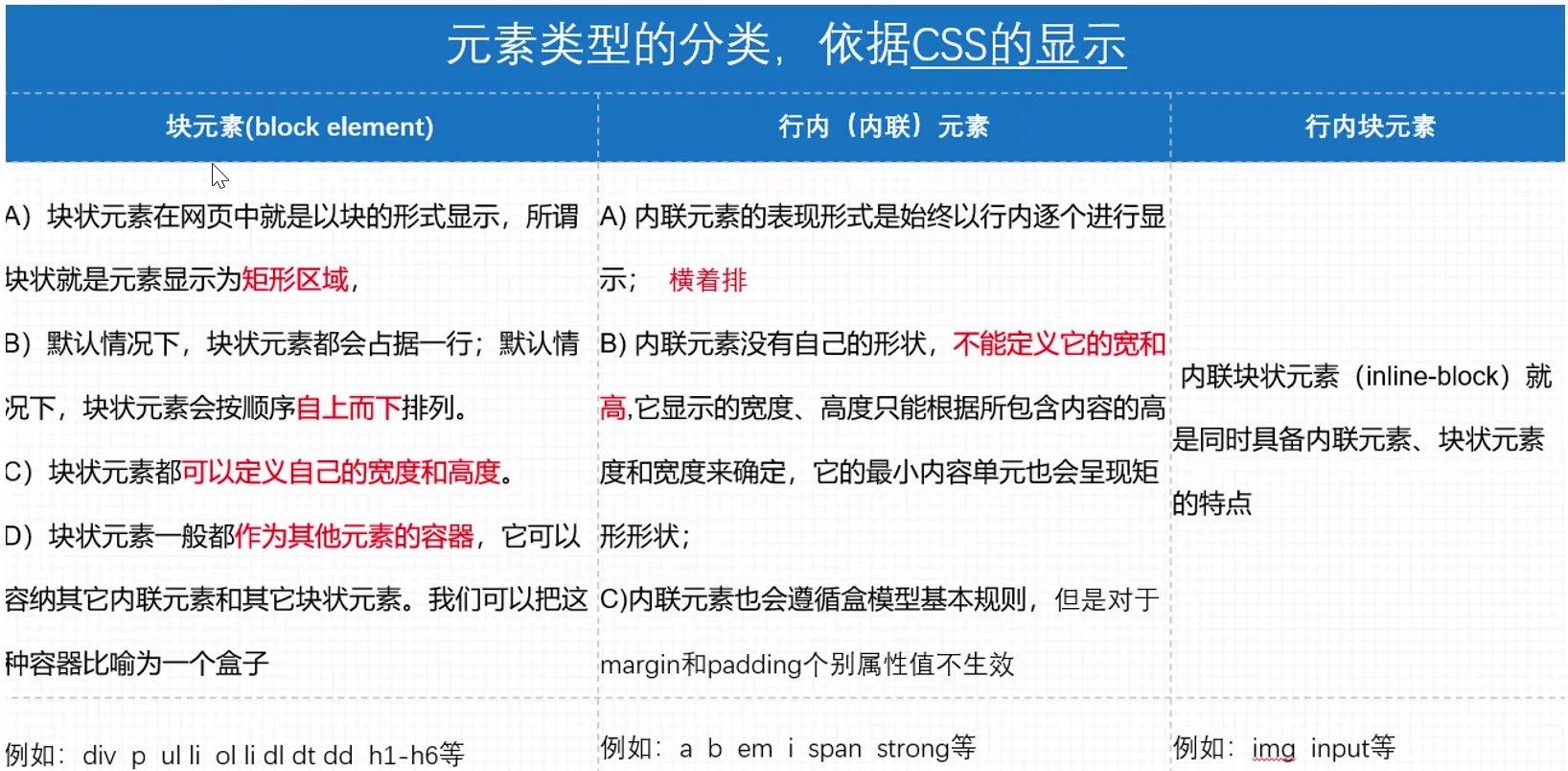
7、元素显示类型
img
可以用display进行相互转换
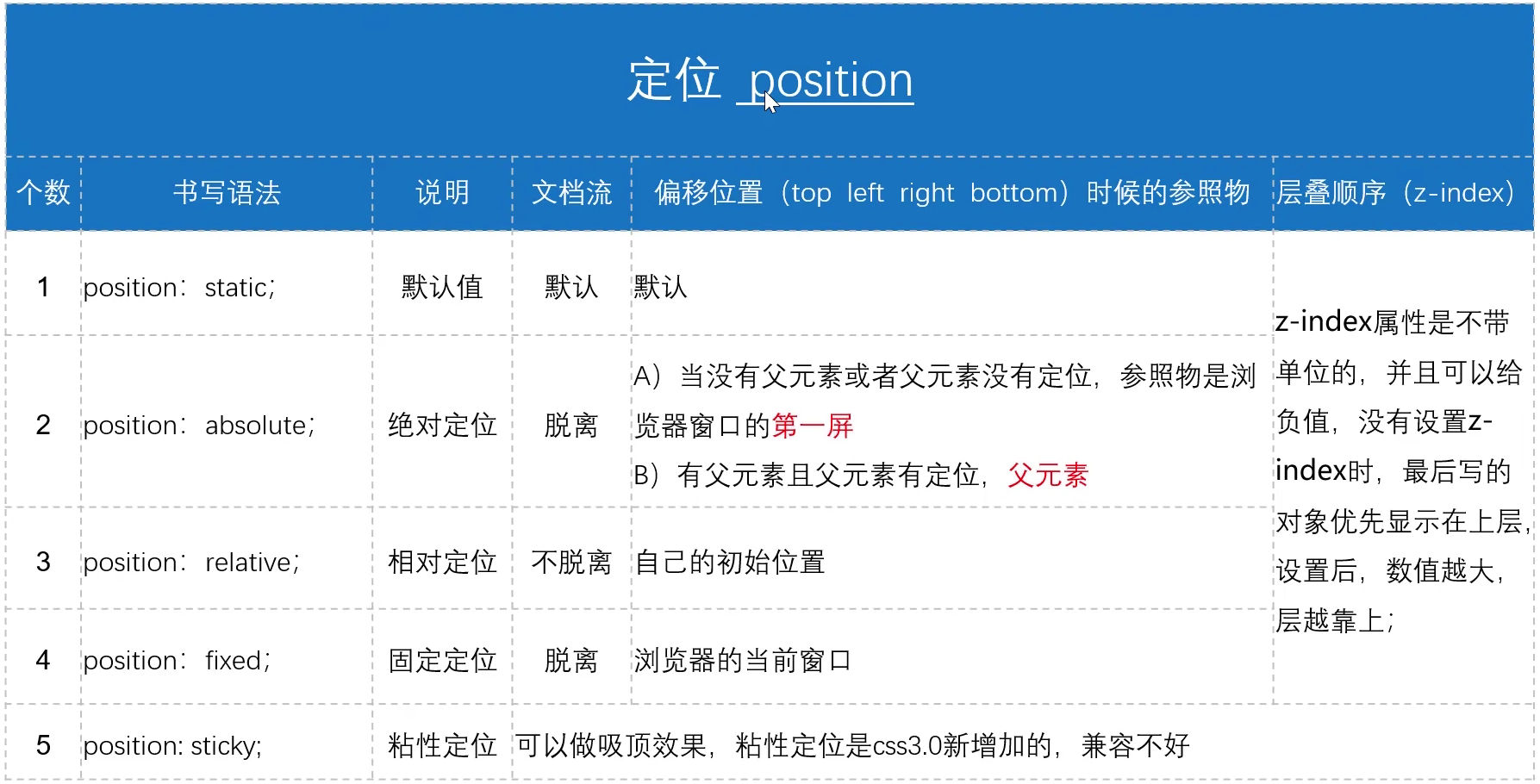
8、定位
img
父子关系如果想让父盒子显示在上面:在子盒子中设置z-index为负值即可
9、三角形案例
img
1 2 3 4 5 6 7 8 9 10 <style type ="text/css" > div { height : 0px ; width : 0px ; border-top : 20px solid red; border-right : 20px solid transparent; border-bottom : 20px solid transparent; border-left : 20px solid transparent; } </style >
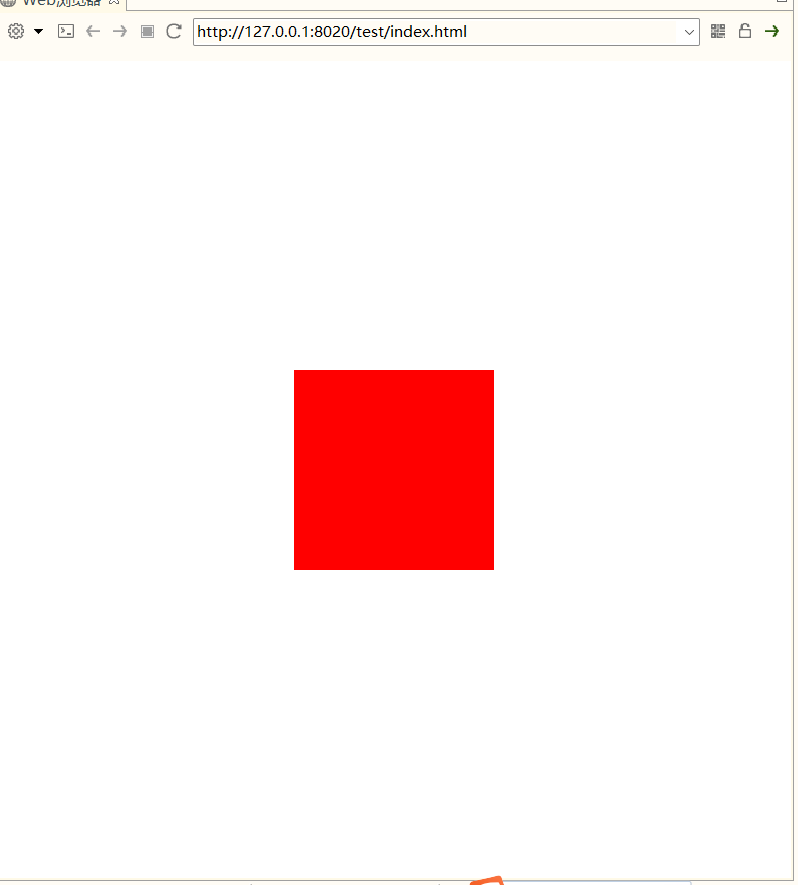
10、水平垂直居中
1 2 3 4 5 6 7 8 9 10 11 12 13 14 15 16 <style type ="text/css" > *{ margin : 0 ; padding : 0 ; } div { height : 200px ; width : 200px ; background-color : red; position : absolute; top : 50% ; left : 50% ; margin-left : -100px ; margin-top : -100px ; } </style >
img
11、浮动和绝对定位的区别
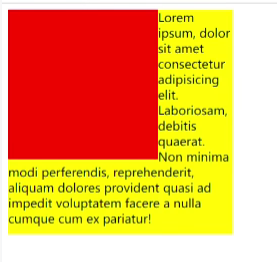
浮动是半脱离状态,文字是环绕效果
img
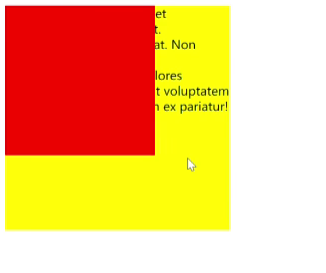
定位是全脱离状态,不会出现文字环绕效果
img
12、calc计算函数
1 width: calc(100% - 200px)
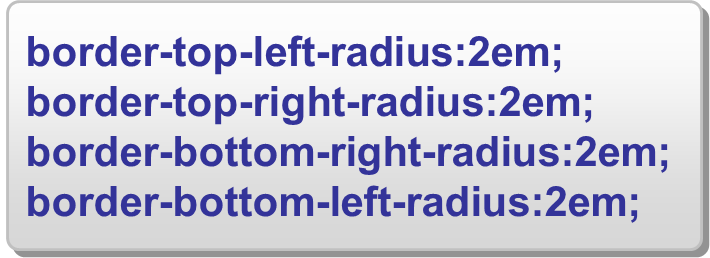
13、圆角属性
等价于:
img
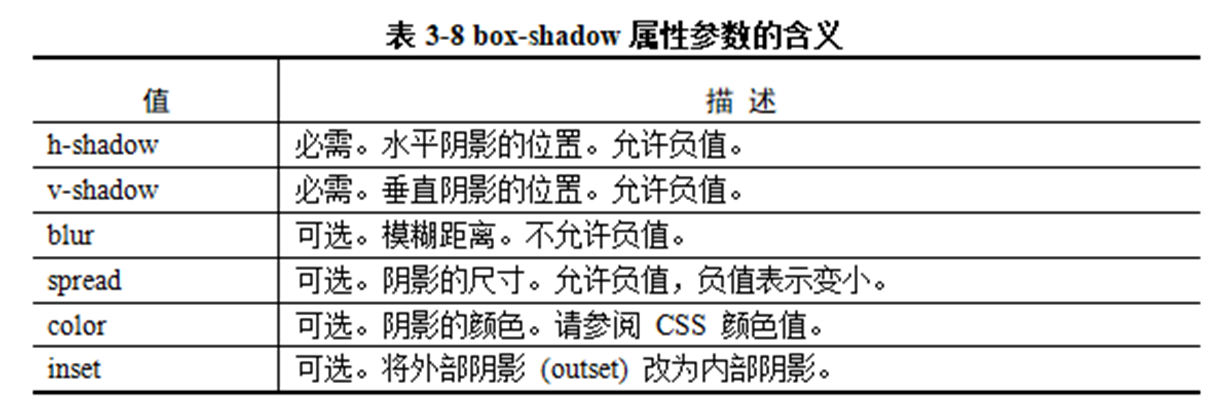
14、方框阴影属性
1 box-shadow: <h-shadow> <v-shadow> [blur] [spread] [color] [inset]
img
JavaScript
1 2 3 4 5 6 7 8 嵌入网页 <script type ="text/javascript" > </script > 单独.js文件调用 <script type ="text/javascript" src ="xxx/xx.js" > </script >
变量声明:
**var**要求不严格,可以在作用范围内重复
**let**要求严格,在相同的作用域内不能重复声明同一个变量
常量声明:
**const**不能与let声明的变量重复,一旦声明就必须初始化,值不能改变
类型转换
parseInt(String)
parseFloat(String)
Number(String) 将字符串转化为数值型
toFixed(String) 按照指定的小数位返回数字的字符串表示
注释
单行注释用// 多行用/**/
typeof
操作数的类型
数组
新建长度为0的数组:var myArray = new Array();
新建长度为n的数组:var myArray = new Array(n);
新建一个指定内容的数组:var myArray = new Array(1,2,3);
简介定义:var myArray = [1,2,3];
获取数组长度 myArray.length;
push()/pop()栈方法
内容可以用alert输出(提示框)
数组相关方法:
(1)concat方法
1 2 3 4 5 6 var a=[1 ,2 ,3 ];var b=[4 ,5 ,6 ];alert (a.concat (b));alert (a.length );可以直接连接数值 如:a.concat (4 ,5 ,6 );
(2)join方法
1 2 3 var a=[1 ,2 ,3 ];alert (a.join ());alert (a.join (":" ));
(3)shift方法
1 2 3 4 var a=[1 ,2 ,3 ];alert (a.shift ());输出1 alert (a.shift ());输出2 alert (a.length );输出长度1
(4)unshift方法
1 2 3 var a=[1 ,2 ,3 ];a.unshift (4 ,5 ,6 ); alert (a);
(5)slice方法
1 2 3 4 5 var a1=[1 ,2 ,3 ,4 ,5 ];alert (a1.slice (1 ,3 )); alert (a1.slice (1 )); alert (a1.slice (1 ,-1 )); alert (a1.slice (-3 ,-2 ));
(6)sort方法
1 2 var a1=[1 ,4 ,2 ,3 ,5 ];alert (a1.sort ());
(7)reverse方法
JavaScript函数
1 2 3 4 5 6 function 函数名(参数1 ,参数2. ..){ } <input type="Submit" value="显示" onClick="函数名()" >
常见事件:
事件 动作 事件 动作
Abort 中止正在加载的对象 Load 浏览器读入文件时
Blur 失去焦点 Unload 关闭当前网页
Focus 获取焦点 MouseDown 按下鼠标左键
Change 改变对象的值 MouseMove 移动鼠标指针
Click 在对象上单击鼠标 MouseOut 鼠标指针离开某对象
DblClick 在对象上双击鼠标 MouseOver 鼠标指针悬停于某对象之上
DrogDrop 拖拽对象 MouseUp 放开鼠标左键
Error 加载文件或图形时发生错误 Move 窗口被移动时
KeyDown 按下键盘上的任意键的瞬间 Resize 窗口大小被改变
KeyPress 按下键盘上的任意键时 Select 选择某对象
KeyUp 某键被按下后弹起来的瞬间 Submit 单击表单上的Submit按钮
Reset 单击表单上的Reset按钮
document对象及操作
document表示整个页面文档
(1)documen.getElementById(id)
1 var a = document.getElementById("name").value;
(2)
document.getElementsByName(name)
1 2 3 4 var userNameInput=document .getElementsByName ("userName" );var userName = userNmaeInput[0 ].value ;返回值为数组对象;如果无符合条件的对象,则返回空数组 由于该方法的返回值是一个数组,所以可以通过位置下标来获得页面元素
1 2 3 4 返回值:数组对象; 如果无符合条件的对象,则返回空数组 例如: var inputs=document .getElementsByTagName (“input”);alert (input.length );
1 2 3 4 返回值:数组对象。如果无符合条件的对象(Form 对象),则返回空数组 例如: var frms=document .forms ; var loginfrm=frms[0 ];
document属性
(1)innerHTML属性
1 2 3 4 5 6 7 8 <p id="p1" >Hello World !</p> <script > document .getElementById ("p1" ).innerHTML ="New text!" ;</script > <script > document .getElementById ("p2" ).style .color ="blue" ;</script >
(2)操作HTML
1 2 3 4 5 var para = document .createElement ("p" );var node = document .createTextNode ("新段落" );para.appendChild (node); var element=document .getElementById ("div1" );element.appendChild (para);
(3)改变元素属性
1 2 3 4 5 6 obj.getAttribute (attribute); obj.setAttribute (attribute,value); 例如: document .getElementById ("div1" ).getAttribute ("name" );
(4)删除元素
1 2 3 4 5 6 7 8 9 10 11 12 13 14 15 16 17 18 19 20 21 22 23 24 25 26 27 28 29 30 31 32 33 34 35 36 37 38 39 40 41 42 var child=document .getElementById ("p1" );var parent=document .getElementById ("div1" );parent.removeChild (child); <script > const loginForm = document .getElementById ('loginForm' ); const usernameInput = document .getElementById ('username' ); const passwordInput = document .getElementById ('password' ); const usernameMessage = document .getElementById ('username-message' ); const passwordMessage = document .getElementById ('password-message' ); loginForm.addEventListener ('submit' , function (event ) { event.preventDefault (); const username = usernameInput.value ; const password = passwordInput.value ; showMessage (passwordMessage,'' ); showMessage (usernameMessage,'' ); var user_flag = false ; var pass_flag = false ; if (username.length === 0 )showMessage (usernameMessage,'请输入用户名' ); else if (!isEnglishCharacter (username))showMessage (usernameMessage,'用户名必须以英文字母开头!' ); else if (username.length < 6 ||username.length >18 )showMessage (usernameMessage,"用户名必须在6到18位" ); else user_flag = true ; if (password.length < 6 )showMessage (passwordMessage,"密码不能小于6位!" ); else pass_flag=true ; if (pass_flag && user_flag) { alert ("注册成功!!" ); } }); function isEnglishCharacter (input ) { const firstChar = input.charAt (0 ); return (firstChar >='a' && firstChar <='z' ) || (firstChar >='A' && firstChar <='Z' ); } function showMessage (element,message ) { element.textContent = message; } </script >
JQurey
1 2 3 4 5 6 7 8 9 10 11 12 13 14 15 16 17 18 19 20 21 22 23 24 25 26 27 28 29 30 31 32 33 34 35 36 37 38 39 40 41 42 43 44 45 46 47 48 49 50 51 52 53 54 55 56 57 58 59 60 61 62 63 64 65 66 67 68 69 70 71 72 73 74 75 76 77 78 79 80 81 <script > $(document ).ready ( function ( function loadStuInfo ( $.ajax ({ type :"get" , url :"http://114.67.241.121:8123/stu/list" , async :true , success : function (e ){ $("#info" ).find ("tr:gt(0)" ).remove (); for (var i=0 ; i<e.data .length ;i++) { $("#info" ).append ( "<tr>" + "<td>" +e.data [i].stuid +"</td>" + "<td>" +e.data [i].stuno +"</td>" + "<td>" +e.data [i].stuname +"</td>" + "<td>" +e.data [i].stumajor +"</td>" + "<td>" +e.data [i].stugender +"</td>" + "<td>" +e.data [i].stugrade +"</td>" + "<td>" +e.data [i].stuphone +"</td>" + "<td>" +e.data [i].stuaddess +"</td>" + "<td>" +e.data [i].stunative +"</td>" + "<td><a href='' class='delete'>删除</a>" + "</tr>" ); } }, }); } loadStuInfo (); $("#submit" ).click ( function ( $.ajax ({ type :"post" , dataType : 'json' , contentType : 'application/json' , url :"http://114.67.241.121:8123/stu/add" , data :JSON .stringify ( { stuaddess : $("#stuaddress" ).val (), stugender : $("#stugender" ).val (), stugrade : $("#stugrade" ).val (), stuid : 0 , stumajor : $("#stumajor" ).val (), stuname : $("#stuname" ).val (), stunative : $("#stunative" ).val (), stuno : $("#stuno" ).val (), stuphone : $("#stuphone" ).val () } ), success :function (e ){ console .log (JSON .stringify (e)); loadStuInfo (); }, }); } ); $("#info" ).on ("click" ,"a" ,function (event ) { event.preventDefault (); var stuid = $(this ).closest ("tr" ).children (":eq(0)" ).text (); $.ajax ({ type :"post" , url :"http://114.67.241.121:8123/stu/del" , data : "stuId=" + stuid, success :function (e ){ console .log (JSON .stringify (e)); loadStuInfo (); } }); } ); } ); </script >
img